Know what your government offices actually emit

GreenGov turns an office estate into a defensible emissions baseline, a plan to cut it, and a report you can publish โ€” in your browser, with your data never leaving it.

Free during the beta ยท no installation ยท works offline

greenenvgov.com
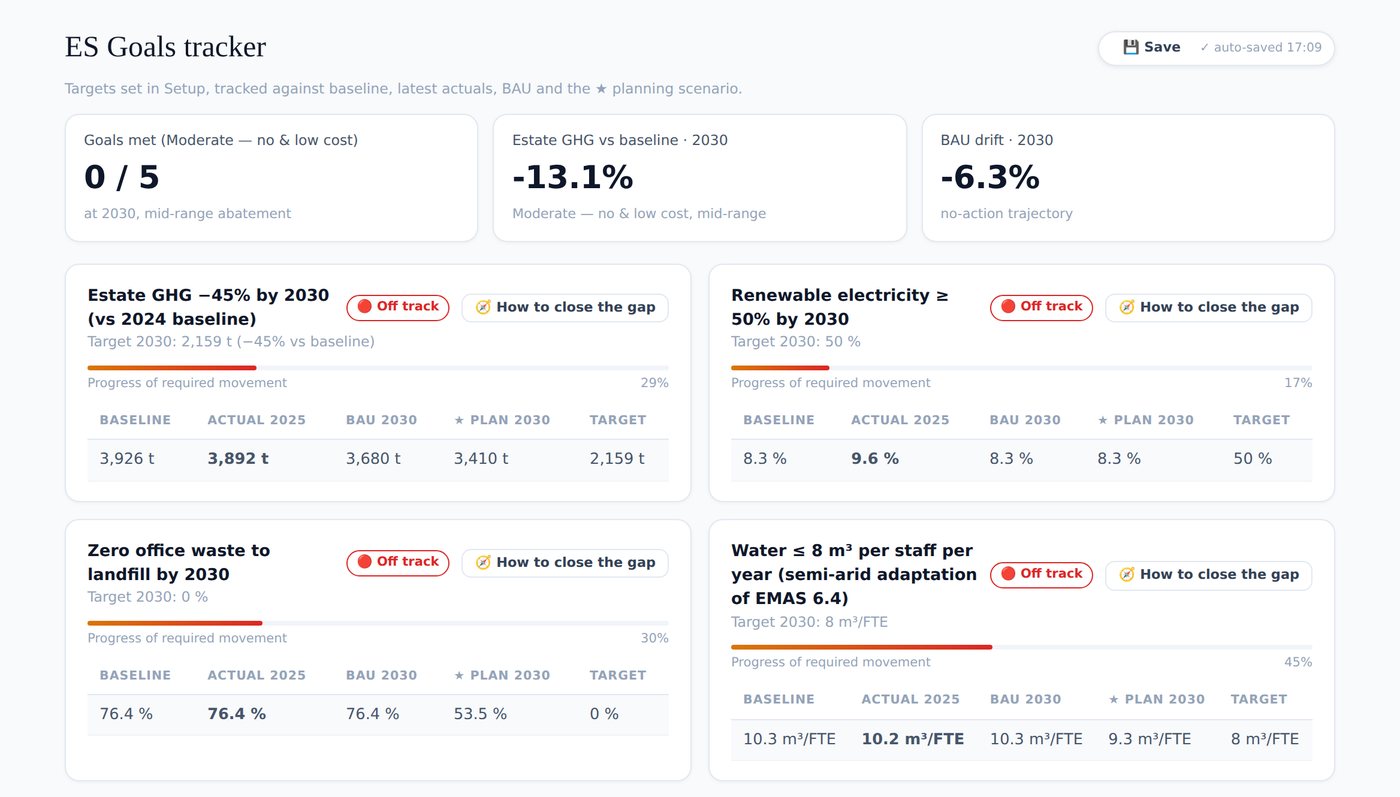
Three emission scenarios for a municipal office estate, each shown at 2030 and 2050

Three courses of action for a fictional municipal estate, each at both planning horizons โ€” with the share delivered by your measures separated from the share the national grid delivers anyway.

From three fields per building to a decision

Most public estates can describe their policies but not their buildings. GreenGov closes that gap without consultants: register your offices, refine what you know, and the analysis follows.

๐Ÿข A baseline on day one

Floor area, headcount, country and climate zone already produce a complete estate footprint โ€” clearly flagged as provisional until real data replaces the defaults.

๐Ÿ“Š Honest about itself

Every figure carries a data tier. The dashboard shows what share of your baseline is actually measured, so modelled numbers can never quietly pose as meter readings.

โšก Sector by sector

Energy, mobility, water & waste, procurement and ICT โ€” each with Excel data-call templates your offices fill offline and you re-import.

๐ŸŽฏ Scenarios that name the technology

Not percentage wishes: T8 tubes to LED, diesel pickups to hybrids, rooftop solar โ€” with the actor who must authorise each one.

๐Ÿ“‰ Your action, not the grid’s

The projection separates what your measures deliver from what national grid decarbonisation delivers anyway. That distinction is what survives scrutiny.

๐Ÿ“„ A report you can publish

One printable document carrying the numbers, the method version and the factor set that produced them. Print to PDF and circulate.
How it goes

A first pass takes an afternoon. The exercise book walks the whole arc with a demonstration estate before you touch your own data.

1
Request access and confirm your email โ€” one link, and you are in.
2
Create a project with your baseline year and the year you are planning to.
3
Register your premises, or import the Excel setup template your offices filled in.
4
Refine sector by sector โ€” watch the measured share climb as invoices replace defaults.
5
Build scenarios, set goals, read the gap advisor, and publish the report.
greenenvgov.com
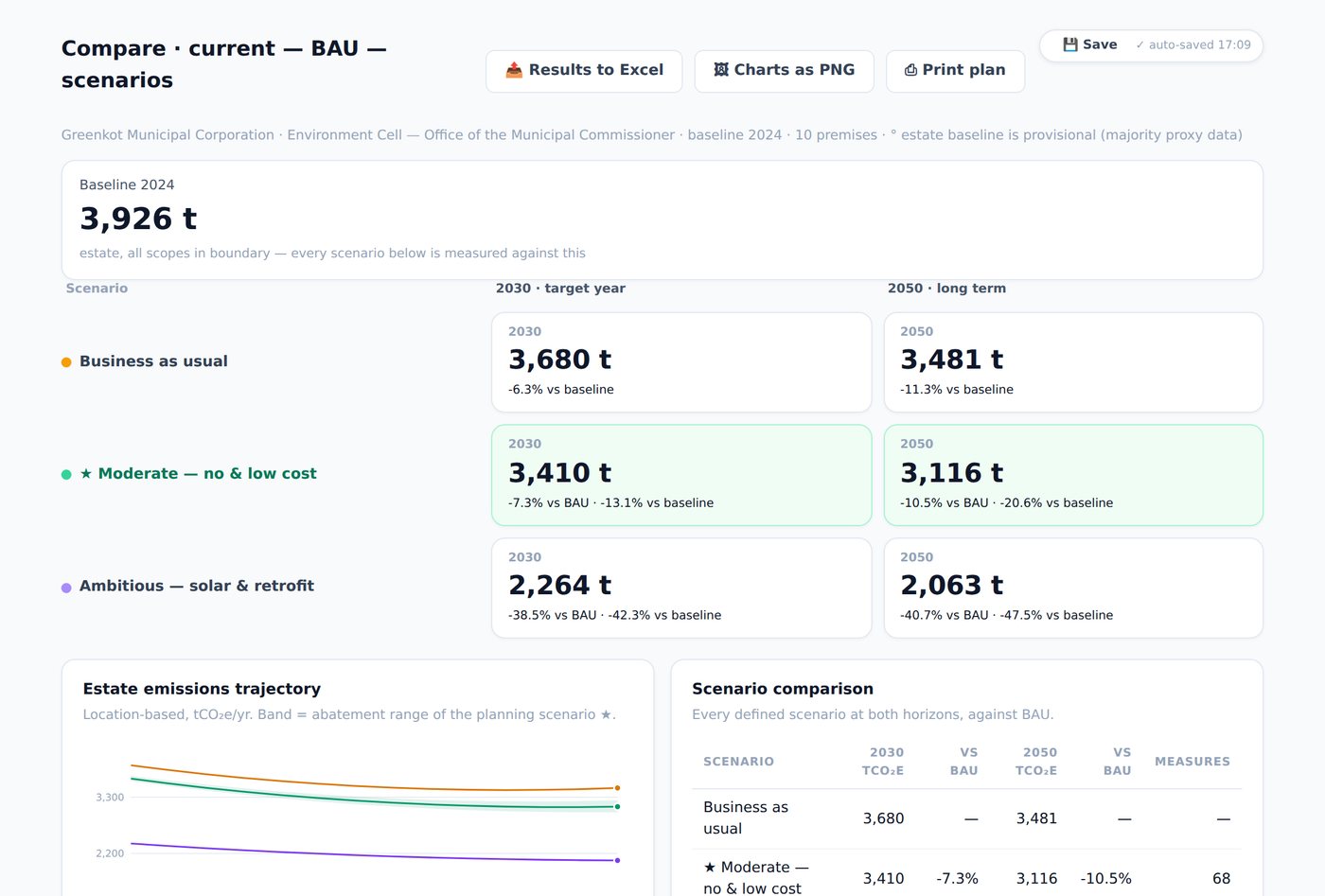
Estate dashboard: total footprint, per-person intensity and measured share

The estate dashboard: total footprint, intensity per person, and the measured-share meter that keeps modelled numbers from posing as meter readings.

Goals that answer “so what do we do?”

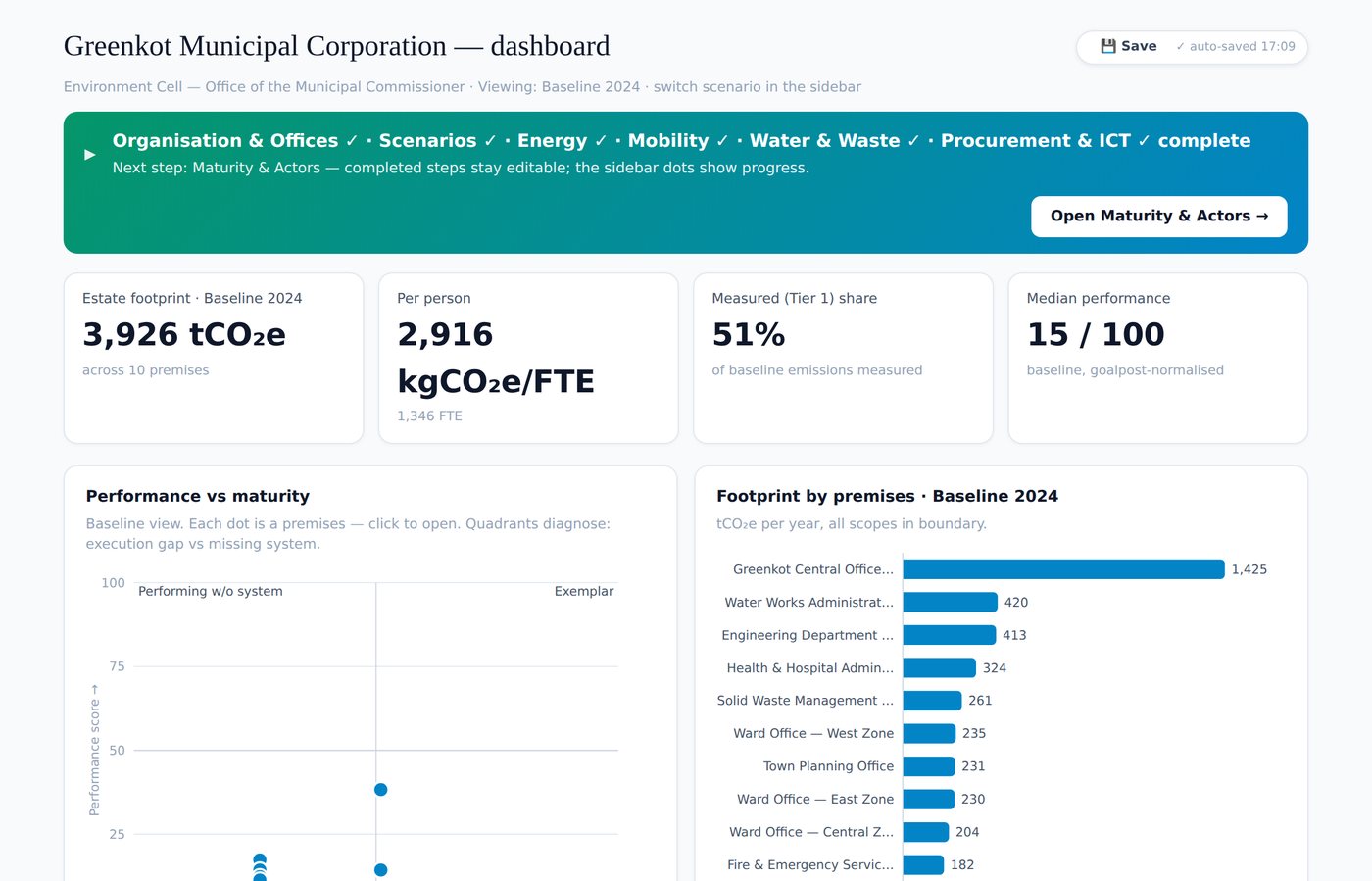
Set a target and GreenGov tracks it against the baseline, the latest actuals, the no-action trajectory and your plan. Where a goal falls short, the gap advisor names the measures that would close it, in cost order, each linking to the page where you change it.

greenenvgov.com
Goals tracker showing five goals with progress bars and how-to-close-the-gap actions

Five goals for the demonstration estate โ€” each with its own target year, progress against the required movement, and an advisor.

What this beta does not claim

The emission factors, benchmarks and costs shipped with GreenGov are illustrative defaults, not official statistics. Before any figure is reported externally, replace them with your national factor set โ€” the tool records which factor version produced every number, and says so on the report. It is a beta: expect rough edges, and keep exports of anything important.

Read it before you trust it

Every formula the tool computes is written out, and the exercise book reproduces the tool’s own numbers by hand โ€” so you can check GreenGov against a calculator.

Get access

GreenGov is in beta and access is by request, so I know who is using it and can tell you when things change.

Request access

Tell me who you are and how you plan to use it, confirm your email, and you are in.

Already signed up?

There is no password. Enter the email you registered with and I will send a one-click link that opens the tool. Your projects live in your browser, so they are exactly as you left them on this device.

The link keeps this browser signed in for a year, so you normally arrive straight in the tool and never see this page.